
Regions, holes and edges
Region shapes
The region can be a rectangle or any simple polygon, convex or not, as long as its outline doesn't cross itself. Examples: an L-shaped wall, the space under the stairs, a circle, or an arch (approximate curves with short straight segments).
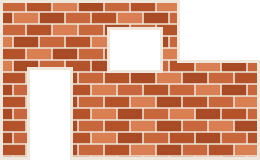
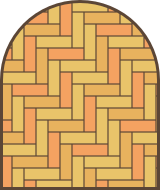
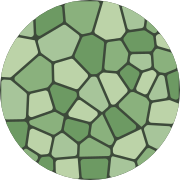
import { createLayout, herringbone, hexagonal, runningBond, voronoi } from "@andamento/core";
import { renderToString } from "@andamento/svg";

/** A wall with a door and a window: an L-shaped region with two holes. */
export function wall() {
  const layout = createLayout({
    region: [
      { x: 0, y: 0 }, { x: 180, y: 0 }, { x: 180, y: 60 }, { x: 260, y: 60 },
      { x: 260, y: 160 }, { x: 0, y: 160 },
    ],
    holes: [
      { x: 30, y: 70, width: 40, height: 90 }, // door, open at the bottom edge
      { x: 110, y: 30, width: 50, height: 40 }, // window
    ],
    tiling: runningBond({ width: 26, height: 12 }),
    gap: 1.5,
    margin: 3,
  });
  return renderToString(layout, { fill: ["#c8673c", "#b4532a", "#d97f52", "#a84a24"], background: "#efe7dc" });
}

/** An arch: the curve is approximated with short straight segments. */
export function arch() {
  const top = Array.from({ length: 33 }, (_, i) => {
    const a = Math.PI - (i / 32) * Math.PI;
    return { x: 100 + 80 * Math.cos(a), y: 90 - 80 * Math.sin(a) };
  });
  const layout = createLayout({
    region: [{ x: 20, y: 200 }, ...top, { x: 180, y: 200 }],
    tiling: herringbone({ length: 36, width: 12 }),
    gap: 1.2,
    margin: 3,
  });
  return renderToString(layout, { fill: ["#e9c46a", "#f4a261", "#e8b25e"], background: "#5b4636" });
}

/** A round region, cut from irregular stones. */
export function round() {
  const circle = Array.from({ length: 64 }, (_, i) => ({ x: 100 + 90 * Math.cos((i / 64) * 2 * Math.PI), y: 100 + 90 * Math.sin((i / 64) * 2 * Math.PI) }));
  const layout = createLayout({ region: circle, tiling: voronoi({ size: 26, seed: 4 }), gap: 2.5, cornerRadius: 3 });
  return renderToString(layout, { fill: ["#8ab17d", "#a7c59a", "#6d9a63", "#bcd3a8"], background: "#3d4a3a" });
}

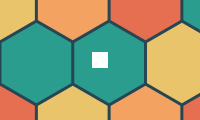
/** A hole inside a single tile becomes a hole in that cell. */
export function holed() {
  const layout = createLayout({
    region: { x: 0, y: 0, width: 200, height: 120 },
    holes: [{ x: 92, y: 52, width: 16, height: 16 }],
    tiling: hexagonal({ size: 42 }),
    gap: 3,
  });
  return renderToString(layout, { fill: ["#2a9d8f", "#e9c46a", "#f4a261", "#e76f51"], background: "#264653" });
}
Holes
holes are left empty: doors, windows, sockets, a fireplace. They're rectangles or polygons. They may overlap each other or stick out past the region's edge, as the door does above. Tiles are cut round holes the same way they're cut at the region's edge, and margin keeps a border round holes too.
A hole that falls entirely inside one tile becomes a hole in that cell (cell.holes). area and centroid allow for it, cellCss returns an even-odd clip-path, and cellPath adds the hole as a subpath.
layout.holes lists the region's holes. regionCss(layout) and regionPath(layout) draw the region with them, for example to shade the area behind the tiles.
A margin can pinch a narrow part of the region shut, which splits it in two.
Edges
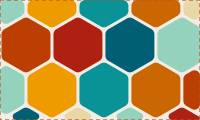
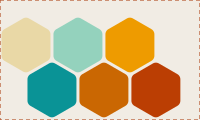
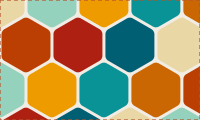
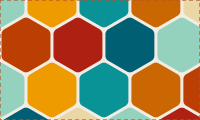
edges decides what happens to tiles that cross the region's edge (or a hole's). The dashed line in the pictures is the region.
import { createLayout, hexagonal, type EdgeMode } from "@andamento/core";
import { renderToString } from "@andamento/svg";
import { outlined, photos } from "./shared";

/** The four edge modes, on hexagons in a rectangle (dashed line: the region). */
export function modes() {
  const out: Record<string, string> = {};
  for (const edges of ["clip", "inside", "overflow", "window"] as EdgeMode[]) {
    const layout = createLayout({
      region: { x: 0, y: 0, width: 200, height: 120 },
      tiling: hexagonal({ size: 30 }),
      gap: 3,
      cornerRadius: 6,
      edges,
    });
    out[edges] = outlined(renderToString(layout, { images: photos(30), background: "#f1ece4" }), layout);
  }
  return out;
}
Window edges
In "clip" mode a cut tile is the piece left inside the region. Rounding, relief and content all treat the cut as a real edge: the bevel runs along it and a photo is centerd in the sliver. That suits work that ends at the region's edge, like a tiled floor.
With edges: "window" the tiles stay whole and the region only hides part of them:
- Each cut cell gets
tile, the whole tile (after the gap).polygonis still the part that shows (its largest piece, if the outline cuts the tile in two; that stays one cell).layout.viewis the area tiles show in: the region less its margin and holes. cellShape(cell)gives the shape to draw (the whole tile, or the cell's own polygon), andvisibleShapes(cell, layout)gives the rounded shape less what's outside the view.- Every renderer rounds, bevels and fills the whole tile, then hides what's outside the view with a straight, sharp cut.
cellCssplaces the element over the whole tile and clips it to what shows; SVG and canvas clip toviewPath(layout). Hit testing only finds what shows. - Content sits where it would in the whole tile, so a photo at the edge is partly hidden. Safe areas fit the whole tile too. To fit the part that shows instead, use
safeArea="visible"in the components,safeArea(cell, layout, { within: "visible" })in core, orcontainWithin: "visible"with SVG'simageFit: "contain". Focal points always aim at the part that shows.
Convex regions without holes use a fast clipping path. Anything else goes through a general polygon overlay, applied only to tiles near an edge, so it costs about the same.