
Andamento flow
Andamento is the flow of a mosaic: tesserae laid in rows (courses) that follow the shapes of the picture. The flow tiling lays its rows along three kinds of guide.
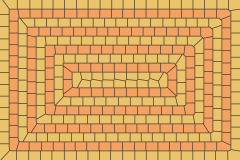
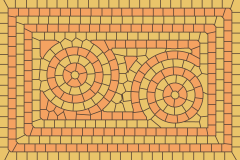
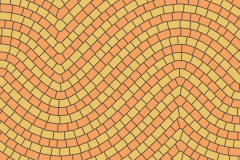
- The region's outline (
followEdges): the default when there's nothing else. Rows run round any holes too, as in opus vermiculatum. - Center points (
centers): each gets a round tessera, ringed by row after row. - Guide curves (
guides): open or closed polylines in layout units. A row runs along each curve, with more rows parallel to it on both sides.
Where rows from different guides meet, they end against each other the way a mosaicist's would: mitred at corners, and fitted together where rings meet straight rows.
ts
import { createLayout, flow, imageFill, protoTileFill } from "@andamento/core";
import { renderToString } from "@andamento/svg";
import { scenePixels } from "./shared";

const region = { x: 0, y: 0, width: 240, height: 160 };
const rows = protoTileFill(["#e9c46a", "#f4a261"]);

/** Rows following the region's outline (the default). */
export function outline() {
  const layout = createLayout({ region, tiling: flow({ size: 9 }), gap: 0.8 });
  return renderToString(layout, { fill: rows, background: "#5b4636" });
}

/** Rows ringing two center points, meeting the rows along the edges. */
export function centers() {
  const layout = createLayout({
    region,
    tiling: flow({ size: 8, centers: [{ x: 75, y: 75 }, { x: 175, y: 95 }], followEdges: true }),
    gap: 0.8,
  });
  return renderToString(layout, { fill: rows, background: "#5b4636" });
}

/** Rows along a guide curve, and parallel to it on both sides. */
export function guide() {
  const curve = Array.from({ length: 25 }, (_, i) => ({ x: (i / 24) * 240, y: 80 + 40 * Math.sin((i / 24) * 2 * Math.PI) }));
  const layout = createLayout({ region, tiling: flow({ size: 8, guides: [{ points: curve }] }), gap: 0.8 });
  return renderToString(layout, { fill: rows, background: "#5b4636" });
}

// #region mosaic
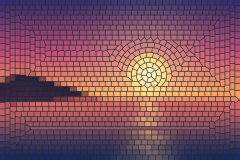
/** A mosaic: rows ringing the sun and following the coast, colored from the picture. */
export function mosaic() {
  const pixels = scenePixels();
  const layout = createLayout({
    region,
    tiling: flow({
      size: 5,
      centers: [{ x: 149, y: 75 }],
      guides: [{ points: [{ x: 0, y: 99 }, { x: 240, y: 99 }] }],
      followEdges: true,
    }),
    gap: 0.6,
  });
  return renderToString(layout, { fill: imageFill(pixels), background: "#2b2524" });
}
// #endregion mosaic
A mosaic
Rows that ring the sun and run along the horizon, colored from the picture with imageFill:
Options
| Option | Default | |
|---|---|---|
size | (required) | The row height: each tessera's width across its row. |
length | 1.3 | Tessera length along its row, as a multiple of size. |
jitter | 0.3 | How much tessera lengths vary, from 0 (all alike) to 0.9. |
guides | none | { points, closed? }[]: curves for rows to follow. |
centers | none | Points for rows to circle. |
followEdges | true without guides or centers | Rows also run along the region's outline and round holes. |
seed | 1 | Varies the random lengths. |
Rows alternate protoTile 0 and 1, so protoTileFill can color by row.
How it's built
- Rows: each row is a band of a distance field. Its edges are the field's level lines, and tesserae are cut across it between seeds spaced along its center line.
- Exact cover: the bands and cuts are assembled into tiles that cover the region exactly, with leftover crumbs merged into a neighbor in the same row.
- Speed: a 400 × 300 region with rows 10 high (about 1,000 tesserae) takes about a quarter of a second.
- Limits:
rotation,originandsizeAtdon't apply.tileScalescales the rows.